

ChatGPT Product Feed vs Google Merchant Center Feed
Compare ChatGPT and Google Merchant Center product feeds field by field, including required data, naming differences and a safe migration workflow.
Key Takeaways: ChatGPT vs Google Product Feeds
5- A Google Merchant Center feed is a useful source for a ChatGPT feed, but it should be mapped and validated rather than copied blindly.
- The core product facts overlap, while field names, seller data, optional attributes and destination-specific rules differ.
- Keep one catalog source of truth and generate channel-specific outputs from it instead of editing two independent files.
- Match price, availability, URL, image and variant values across the feed, product page and structured data.
- Validate each channel separately because acceptance by one platform does not prove compliance with the other.
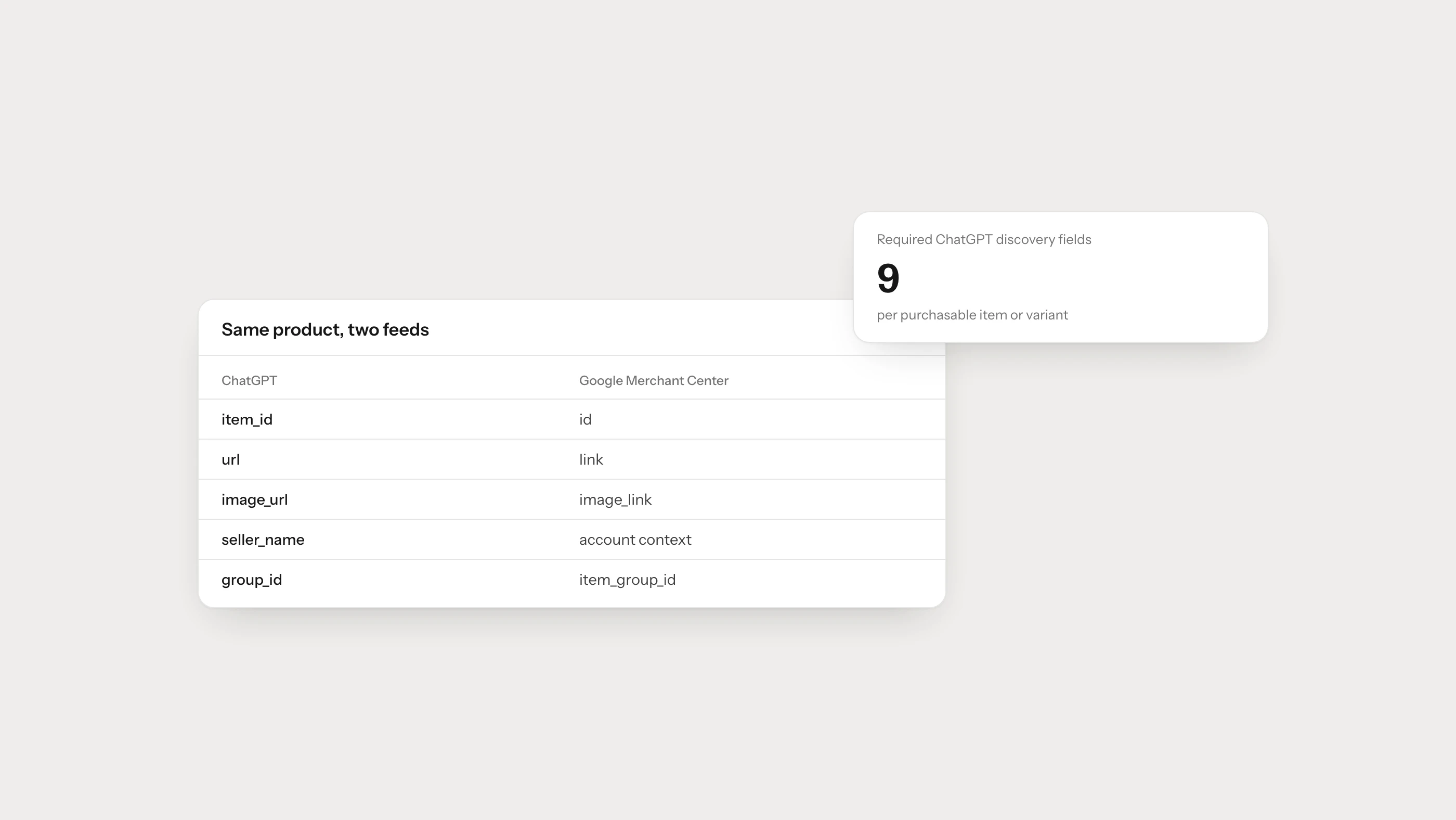
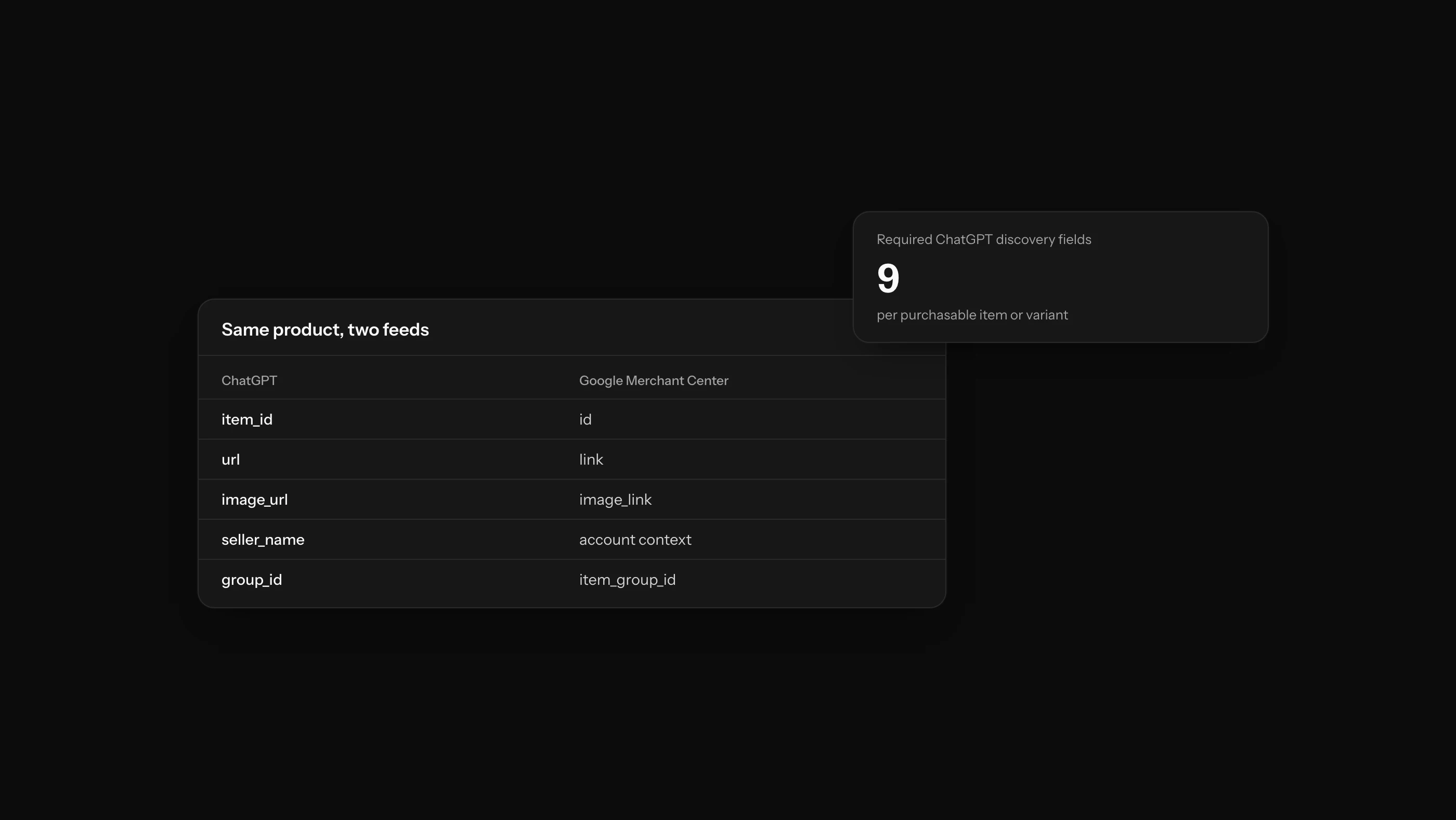
A Google Merchant Center feed can provide much of the data needed for a ChatGPT product feed, but the files are not automatically interchangeable. The safer approach is to keep one product-data source and transform it into separate, validated outputs for OpenAI and Google.
Both systems need to know what the product is, where it can be purchased, how much it costs and whether it is available. The difference is in the schema, field names and rules attached to each destination. Treating one file as a universal feed often produces subtle errors: a missing seller name, a mismatched variant URL or a value that is valid in one channel but rejected in another.
ChatGPT vs Google Merchant Center at a Glance
| Question | ChatGPT discovery feed | Google Merchant Center feed |
|---|---|---|
| Main purpose | Product discovery in ChatGPT | Google shopping experiences, free listings and advertising |
| Current reference | OpenAI Agentic Commerce stable schema | Google Merchant Center product data specification |
| Product ID field | item_id | id |
| Product page field | url | link |
| Main image field | image_url | image_link |
| Seller name | Required as seller_name | Usually managed through merchant/account context |
| Basic availability | Required with OpenAI-supported values | Required for common online product listings |
| Basic price | Required as amount plus currency | Required as amount plus currency |
| Variant relationship | Optional group and variant fields | item_group_id and category-specific variant attributes |
| Ads and checkout | Separate requirements beyond discovery | Ads and destination policies managed within Google ecosystem |
The table describes the common baseline, not every conditional rule. Google requirements vary by product category, market and destination. OpenAI also publishes optional and integration-specific fields beyond its nine required discovery fields.
Use the OpenAI product feed reference and Google’s product data specification when implementing a live export.
Field Mapping for the Core Product Record
The following mapping is a practical starting point for a transformation layer.
| Product fact | ChatGPT field | Google field | Migration check |
|---|---|---|---|
| Stable ID | item_id | id | Preserve as text and never recycle |
| Title | title | title | Keep variant-defining attributes consistent |
| Description | description | description | Send factual, visible product information |
| Product URL | url | link | Resolve to the same purchasable item or variant |
| Brand | brand | brand | Use the real product brand, not the store category |
| Seller | seller_name | Account context | Populate explicitly for ChatGPT |
| Main image | image_url | image_link | Match the selected variant |
| Availability | availability | availability | Convert only to documented destination values |
| Regular price | price | price | Match amount, currency and active offer |
| GTIN | gtin | gtin | Include only a genuine, valid identifier |
| MPN | mpn | mpn | Preserve manufacturer punctuation and casing |
| Variant group | group_id | item_group_id | Keep parent relationships stable |
Do not build the transformation by changing headers alone. Some values also need channel-specific normalization and validation.
Where the Requirements Differ
Seller identity
OpenAI’s basic discovery record requires seller_name. A Google feed generally operates inside a Merchant Center account where merchant identity is already configured. If you derive a ChatGPT feed from Google data, seller name may need to come from your merchant master data rather than a feed column.
Product and image URLs
OpenAI uses url and image_url; Google commonly uses link and image_link. The renamed values should still lead to the same product and selected variant. Check public access, redirects, canonical tags and image response types after transformation.
Categories and attributes
Google has a mature taxonomy and category-specific requirements. Apparel, for example, may need fields such as color, size, gender and age group. OpenAI supports product attributes too, but its stable feed has its own naming and value conventions.
Store the underlying facts, such as “color: navy” or “material: linen”, as clean catalog attributes. Then map those facts into each destination’s schema. Do not store a Google-specific field name as the only copy of the business data.
Shipping, returns and promotions
Both ecosystems can use commercial details beyond the core record, but their structures and enablement paths differ. Model shipping, return and promotion rules centrally, then build explicit adapters. Copying a nested Google value into an OpenAI field without checking its expected structure is not a migration strategy.
Can Google-Compatible Feeds Be Used With OpenAI?
OpenAI’s feed documentation includes Google-compatible feed guidance. That does not remove the need to validate the output against the active OpenAI schema. Compatibility usually means a supported migration path, not that every field, value and destination rule is identical.
Before sending an existing feed:
- Confirm that all nine OpenAI discovery fields can be populated.
- Add a reliable seller name source.
- Check how variants and IDs are mapped.
- Convert destination-specific field names and values.
- Remove placeholders from optional fields.
- Validate a small sample before exporting the full catalog.
One Catalog, Two Channel Outputs
The strongest architecture has three layers:
Commerce platform / PIM / ERP
          ↓
Normalized product record
          ↓
OpenAI feed adapter + Google feed adapter
          ↓
Channel-specific validation and monitoring
The normalized record should hold product identity, offer, variant and logistics facts without tying them to one platform’s column names. Each adapter then handles naming, value formats and optional fields.
This reduces drift. When stock changes, the source changes once. Both outputs can then be refreshed from the same truth rather than being edited by different teams in different spreadsheets.
Product Page and Structured Data Still Matter
The feed is not the only copy of the product. The landing page and its structured data should agree with it.
Google’s merchant listing guidance recommends Product and Offer markup for purchasable product pages and may verify submitted product data against the site. OpenAI also explains that a feed gives merchants greater control and freshness; it does not suggest that inaccurate landing pages become irrelevant.
Compare these values automatically:
- product and variant identity,
- canonical URL,
- price and currency,
- availability,
- brand,
- GTIN or MPN,
- main variant image.
Use E-commerce Product Page Optimization for AI Search for the on-page implementation.
Migration Checklist
Before mapping
- Choose the catalog source of truth.
- Document who owns product, price and stock data.
- Identify category-specific Google rules.
- Read the current OpenAI Stable specification.
During mapping
- Preserve stable identifiers as strings.
- Map every purchasable variant separately.
- Add seller name for ChatGPT.
- Normalize availability and money values.
- Keep source attributes separate from channel labels.
After mapping
- Validate OpenAI and Google outputs independently.
- Compare a sample against live product pages.
- Test product and image URLs from outside the admin network.
- Monitor rejected products and stale offers by channel.
- Retest whenever a theme, catalog app or feed exporter changes.
Which Feed Should You Fix First?
Fix the source data first. If the same wrong price appears in both feeds, changing one exported file hides the symptom for a single channel and leaves the cause in place.
Prioritize errors in this order:
- Products that cannot be purchased,
- Incorrect price or availability,
- Wrong product or variant identity,
- Broken pages and images,
- Missing required fields,
- Missing optional detail.
Then review visibility. Brantial AI Visibility Analysis can show whether target products and competitors appear for the shopping questions that matter, while Site Health helps identify recurring page-health problems.
Frequently Asked Questions
Is a ChatGPT product feed the same as a Google Shopping feed?
No. They share many product facts, but use different schemas and destination rules. Generate separate validated outputs from one catalog source.
Do I need two product databases?
No. One normalized product record with two feed adapters is usually easier to maintain and less likely to drift.
Can a field be valid for Google and invalid for ChatGPT?
Yes. Field names, accepted values, required status and nested structures can differ. Validate each output with the destination’s current documentation.
Which fields deserve the most frequent checks?
Price, availability, selected-variant URL and image usually change or break most quickly. Monitor them alongside rejected rows and HTTP errors.