

AI Crawler Traffic Analysis: How to Track LLM Crawlers and AI Search Bots
Learn how to identify AI crawlers in server logs, set robots.txt rules for search and training bots, verify requests, and turn crawl data into useful action.
Key Takeaways: AI Crawler Traffic Analysis
5- AI companies use different bots for search, user-requested retrieval and model training; one blanket robots.txt rule can produce the wrong result.
- OAI-SearchBot controls eligibility to appear in ChatGPT search, while GPTBot controls potential training use. The two decisions are independent.
- Server logs show requested URLs, response codes and crawl frequency, but a user-agent should be verified before it is treated as legitimate bot traffic.
- robots.txt manages crawling, not confidentiality or guaranteed deindexing. Private content still needs authentication and access control.
- The useful outcome of log analysis is a prioritized fix list: blocked public pages, repeated errors, rendering gaps and wasted crawling.
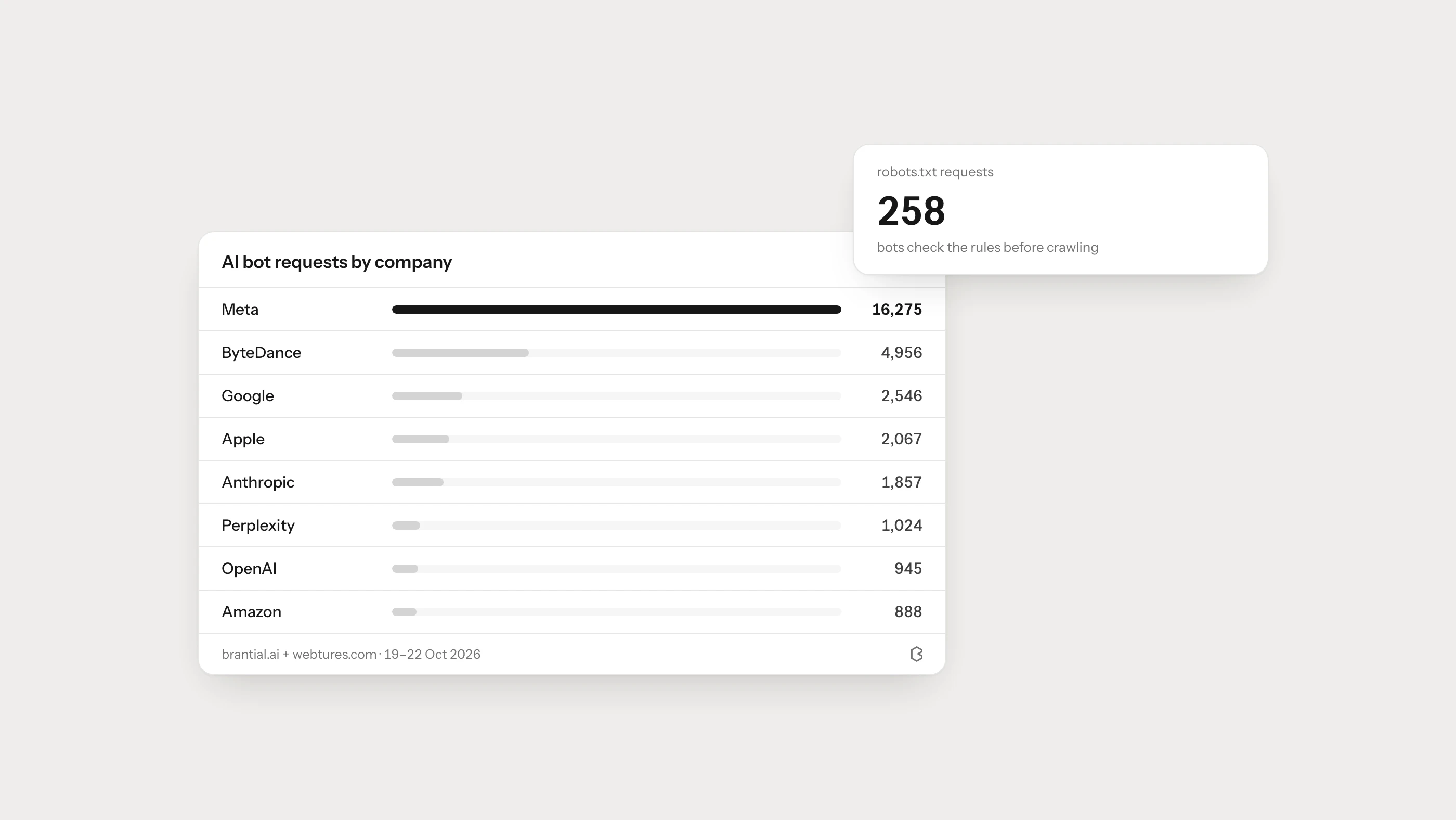
AI crawler analysis starts with a simple question: which automated systems requested your pages, and what happened when they did? Server logs can answer it. They show the requested URL, time, user-agent, response code and often the source IP for every visit, including visits that never execute analytics JavaScript.
The difficult part is interpretation. OAI-SearchBot, GPTBot and ChatGPT-User, for example, do not describe the same activity. Treating every AI-related user-agent as one bot can lead a team to block search visibility while trying only to opt out of training.
Which AI Crawler Does What?
Use the provider’s current documentation as the source of truth because bot names and policies can change. The table below is a practical starting point, not a permanent registry.
| User-agent | Stated purpose | Practical decision |
|---|---|---|
OAI-SearchBot | Discovers and links to content in ChatGPT search | Allow it if you want pages to be eligible for ChatGPT search summaries and links |
GPTBot | May crawl content for OpenAI model improvement | Allow or block according to your training policy; this is separate from search inclusion |
ChatGPT-User | Fetches a page in response to a user action | Analyze separately from broad discovery crawling |
Claude-SearchBot | Supports search result quality and visibility | Allow it if Claude search discovery matters to you |
ClaudeBot | Crawls content that may be used for model development | Apply your training policy independently |
Claude-User | Retrieves pages for user-requested access | Treat as on-demand retrieval rather than ordinary sitewide crawling |
PerplexityBot | Surfaces and links to websites in Perplexity search | Allow it if you want eligible public pages to be discoverable there |
OpenAI explains the distinction between its bots in the Publishers and Developers FAQ. Anthropic documents ClaudeBot, Claude-SearchBot and Claude-User separately in its web crawler guidance. Perplexity publishes its bot purpose and verification details in the Perplexity crawler documentation.
What Is OAI-SearchBot?
OAI-SearchBot is OpenAI’s search crawler. OpenAI states that sites should allow it if they want their content to be eligible for inclusion in ChatGPT search results. Eligibility is not a promise of a citation or ranking; the page still has to be useful, accessible and relevant.
This distinction matters: blocking GPTBot does not require blocking OAI-SearchBot. A publisher can opt out of potential training use while continuing to allow search discovery. OpenAI also notes that a host or CDN-level block can prevent access even when robots.txt allows the bot, so review both layers.
A Practical robots.txt Decision Table
Decide what you are trying to achieve before writing a rule.
| Goal | Appropriate action | Common mistake |
|---|---|---|
| Be eligible for ChatGPT search | Allow OAI-SearchBot and check CDN/WAF access | Allowing it in robots.txt while blocking its IP range at the edge |
| Opt out of OpenAI training crawling | Disallow GPTBot | Blocking every OpenAI user-agent, including search discovery |
| Support Claude search discovery | Allow Claude-SearchBot | Assuming ClaudeBot and Claude-SearchBot have the same purpose |
| Keep private material private | Require authentication and enforce authorization | Relying on robots.txt as a security control |
| Remove a public page from search | Use an appropriate noindex or removal workflow and let the relevant crawler see it | Disallowing crawl before the crawler can read noindex |
| Reduce unnecessary crawl load | Restrict low-value paths and rate-limit abusive traffic carefully | Blocking useful public content sitewide |
A publisher that wants ChatGPT search eligibility but does not want GPTBot training crawl can use:
User-agent: OAI-SearchBot
Allow: /

User-agent: GPTBot
Disallow: /
Place the file at /robots.txt, make sure it returns a successful response, and inspect the live version after deployment. Google’s robots.txt guidance is clear about the limit of this mechanism: it controls crawler access, not confidentiality, and a blocked URL may still be known through external links.
What Should You Capture From Server Logs?
At minimum, keep these fields during analysis:
- timestamp and time zone,
- requested path and query string,
- HTTP method and response status,
- user-agent and source IP,
- response size and request duration,
- referrer, when present.
Normalize URLs before grouping them. /guide, /guide/ and tracking-parameter variants can otherwise look like separate pages. Keep the raw data as well, so you can return to individual requests when a pattern needs investigation.
How to Verify That an AI Bot Is Genuine
A user-agent string is a claim, not proof. Any script can call itself GPTBot or PerplexityBot.
Verification should follow the method published by the provider. This may involve matching a request against published IP ranges, performing forward and reverse DNS checks, or using an edge provider’s verified-bot classification. Cloudflare describes several verification methods in its Verified Bots documentation.
Do not permanently allow an unverified request only because its name looks legitimate. Record unverified traffic in a separate bucket until you can establish its origin.
How to Analyze AI Crawler Logs
Start with a seven-day sample, then widen the period if the site has little traffic.
- Classify the bot. Separate search crawlers, training crawlers, user-triggered fetchers and unknown agents.
- Verify the source. Apply the provider’s published verification method where available.
- Group by response code. Investigate
401,403,404,429and5xxresponses before celebrating request volume. - Group by page type. Compare product, category, documentation, blog and legal templates rather than reviewing URLs one by one.
- Check valuable orphan pages. A high-value page with no bot visits may lack internal links, sitemap discovery or crawl permission.
- Inspect repeated low-value requests. Faceted URLs, calendars and parameter loops can consume crawl capacity without improving discovery.
- Turn findings into owners and deadlines. “43% of requests returned 403” is a symptom; “edge rule blocks three public product templates” is an actionable issue.
How to Read the Patterns Correctly
More crawler traffic is not automatically better. A spike may come from repeated errors or a broken URL pattern. Low traffic is not automatically a penalty either; user-triggered fetchers may appear only when a specific page is requested.
Use crawl data alongside other evidence:
- Is the page present in XML sitemaps and internal navigation?
- Does the URL return
200without a login or geography-specific challenge? - Is the main answer present in the initial or rendered HTML?
- Are canonical and language annotations consistent?
- Do AI answers cite the page for the prompt set that matters?
- Do referrals arrive with a recognizable source, such as
utm_source=chatgpt.comfor ChatGPT search referrals described by OpenAI?
Crawler access is a prerequisite in some discovery paths, not a visibility score on its own.
Common Problems Found in AI Crawl Audits
The most useful audits tend to uncover ordinary technical issues with new consequences:
- a WAF rule blocks verified bots along with scrapers,
- public documentation returns
403outside the company’s primary market, - client-rendered pages expose only an empty application shell in raw HTML,
- canonical tags point filtered pages to the wrong category,
- internal links are JavaScript controls without crawlable
hrefvalues, - stale sitemap URLs return redirects or
404, - robots.txt blocks assets required to render the main content,
- rate limits respond to legitimate crawlers with persistent
429errors.
If rendering is the concern, use Can AI Crawlers Read JavaScript Websites?. For a wider technical review, follow the AI Site Audit Checklist or inspect the site with Brantial Site Health.
Frequently Asked Questions
Does allowing OAI-SearchBot guarantee a ChatGPT citation?
No. It makes the content eligible to be discovered for ChatGPT search, but relevance and selection are not guaranteed.
Can robots.txt protect confidential content?
No. Protect confidential or paid content with authentication and authorization. robots.txt is a crawler instruction file that anyone can read.
Should every AI bot be allowed?
There is no universal answer. Decide separately whether you want search discovery, user-requested retrieval and training access, then document the policy with legal, security and content teams.
Can GA4 replace server log analysis?
No. Many bots do not execute analytics JavaScript. GA4 is useful for human referral sessions; server or edge logs are the more dependable record of crawler requests.
How often should the policy be reviewed?
Review it when a provider changes its bot documentation, when the site’s access controls change, and at least quarterly as part of technical search maintenance.