

ChatGPT Product Feed Requirements: A Practical 2026 Guide
Learn the nine required ChatGPT product feed fields, supported values, submission path and quality checks merchants need for product discovery.
Key Takeaways: ChatGPT Product Feed Requirements
5- OpenAI’s stable discovery feed requires nine fields for every purchasable item or variant: item ID, title, description, URL, brand, seller name, image URL, availability and price.
- Each row should represent one purchasable item or variant, with public URLs and a stable identifier that is never reused.
- Use the stable schema for a live file-upload integration; the draft schema is for planning and feedback, not production.
- Shopify and Etsy catalogs are already integrated according to OpenAI, while other merchants can apply to share a feed.
- A valid feed improves control and freshness, but it does not guarantee that a product will appear for every shopping prompt.
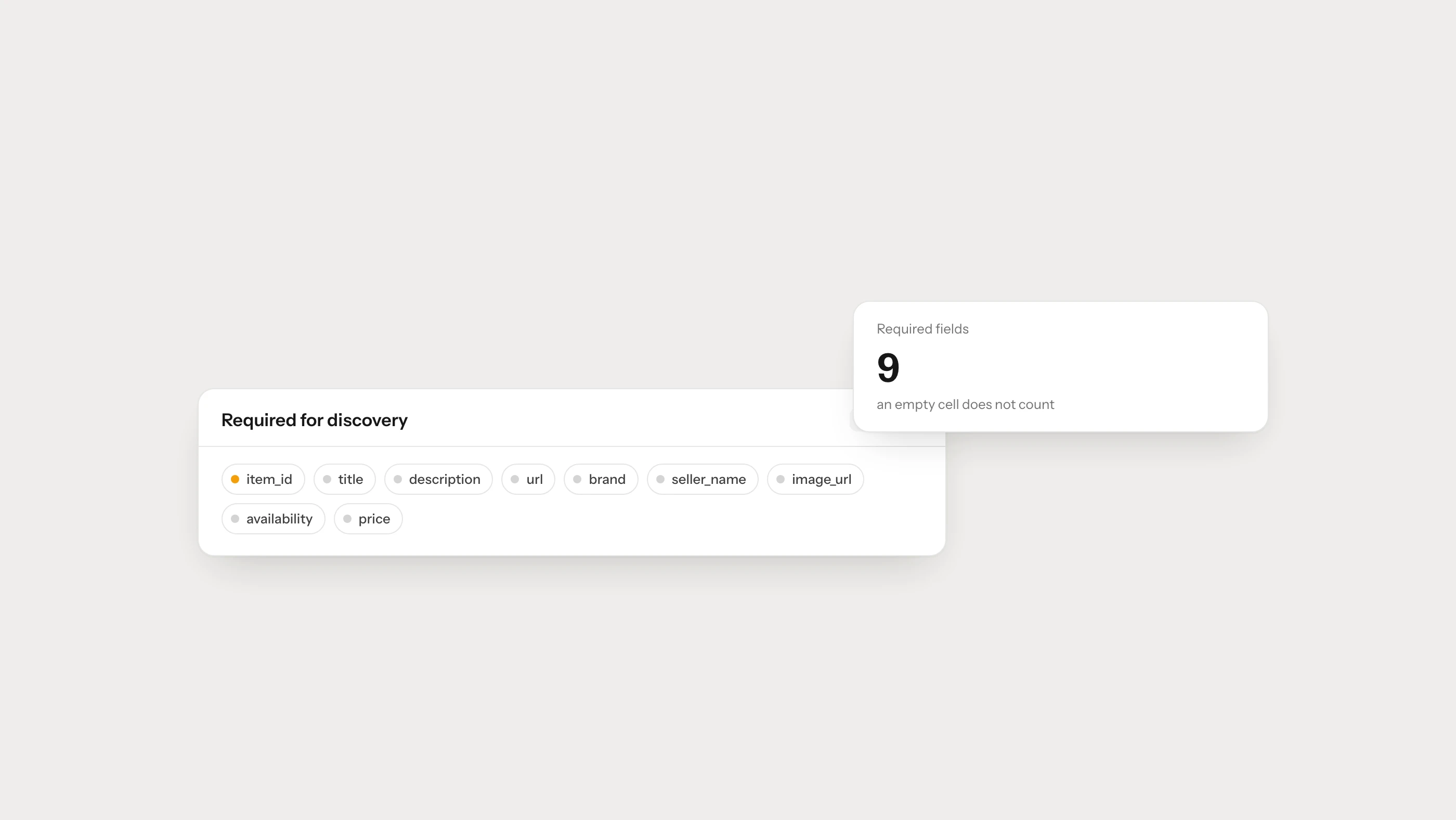
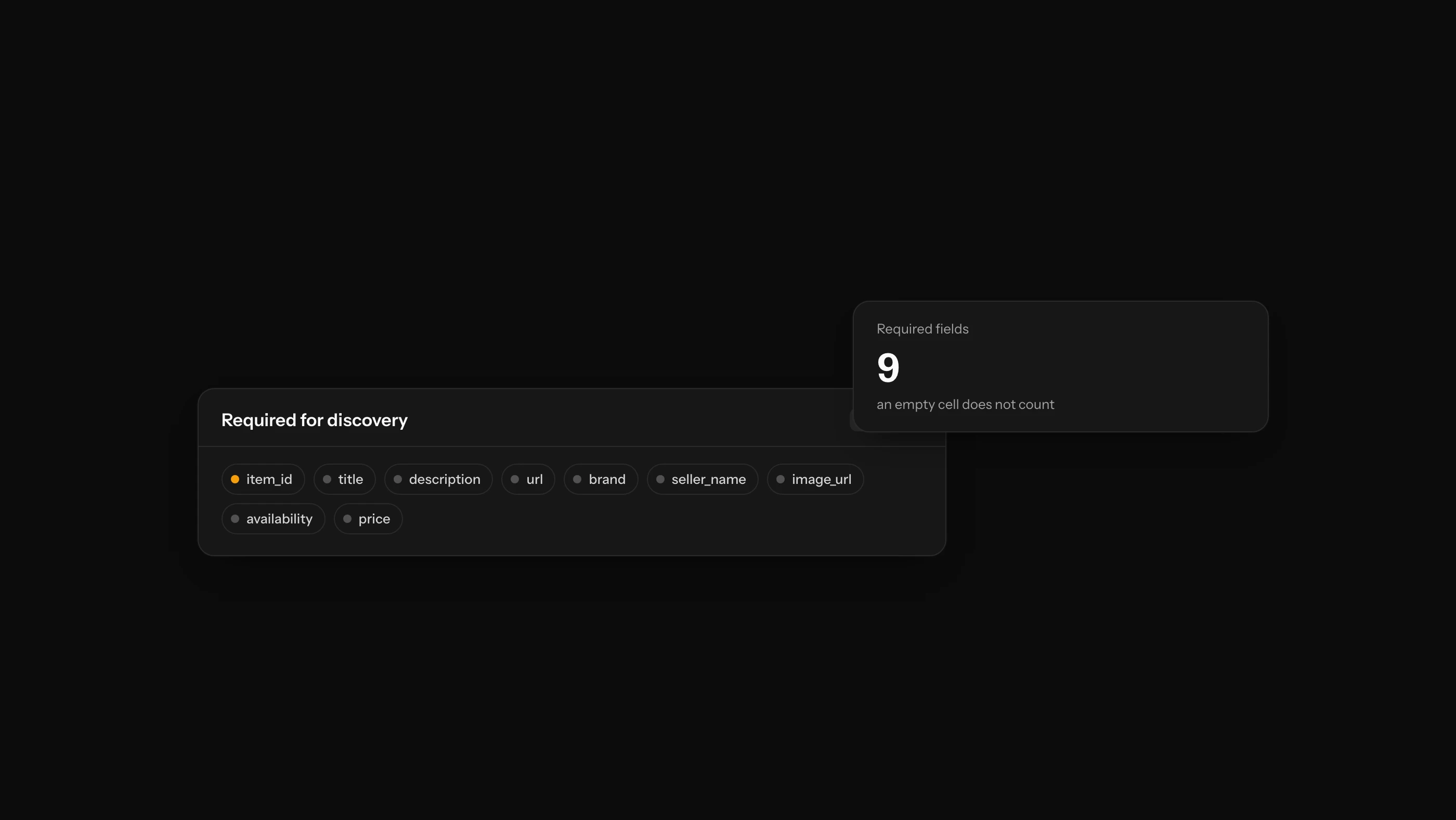
If you are preparing a product feed for ChatGPT, begin with the nine fields OpenAI marks as required for discovery: item_id, title, description, url, brand, seller_name, image_url, availability and price. Submit one row for each item or variant a customer can actually purchase.
That is the short answer. The more useful answer is that passing validation and representing the product correctly are two different jobs. A technically valid record can still be weak if the title is vague, the selected image belongs to another color, or the price on the product page has changed. This guide covers both the specification and the quality checks behind it.
OpenAI’s product feed documentation is evolving, so use the official stable feed reference as the final authority when you build or update an integration.
What Is the ChatGPT Product Feed?
A ChatGPT product feed is a structured catalog that a merchant can share for product discovery. It gives OpenAI current, merchant-controlled information about the items available for sale. The feed can describe prices, availability, variants, images, product attributes, shipping, returns and reviews.
The feed supports discovery; it is not the checkout itself. OpenAI currently says shoppers complete purchases on the merchant’s own website or app. Ads and checkout integrations have separate requirements, so do not add their fields to a discovery implementation without checking the relevant specification.
OpenAI also distinguishes between two schema views:
- Stable: the supported path for file-upload integrations.
- Draft: published for planning and feedback, but not supported for production use yet.
If your goal is a working feed today, build against Stable and record the version you used in your technical documentation.
The Nine Required ChatGPT Product Feed Fields
Every required field must contain a valid value. An empty cell does not satisfy the requirement.
| Field | What it should contain | Example |
|---|---|---|
item_id | Permanent ID for this item or variant | TRAIL-BLK-42 |
title | Clear product name, including the relevant variant | Trail running shoes: black, size 42 |
description | Factual plain-text description | Waterproof trail shoes with a rubber outsole. |
url | Public product page, ideally with the variant shown | https://example.com/trail-shoes?color=black&size=42 |
brand | Brand shown on the product page | Northline |
seller_name | Merchant supplying the offer | Northline Outdoor |
image_url | Direct public image URL for this variant | https://example.com/images/trail-black.jpg |
availability | One of the supported stock values | in_stock |
price | Amount in major units followed by currency | 79.99 USD |
OpenAI recommends concise titles and plain-text descriptions, with an upper target of 150 characters for the title and 5,000 for the description. Those are ceilings, not writing targets. A useful 65-character title is better than a padded 150-character one.
How Should item_id Be Created?
The item ID must be stable and unique within the feed. Once an ID identifies a product or variant, do not later assign it to something else.
A practical ID policy has three rules:
- Use a value generated by the catalog or inventory system, not the product title.
- Preserve the same value through title, price and description updates.
- Give every purchasable variant its own ID.
An SKU can sometimes serve this purpose if your business guarantees that SKUs are unique and permanent. If your team occasionally edits or recycles SKUs, use a separate immutable catalog ID instead.
What Makes a Good Feed Title and Description?
Write the title so a person can identify the exact item without opening the page. Include the brand, product type and the attribute that separates the variant when relevant. Avoid sale messages, keyword lists and claims such as “best” that the record cannot substantiate.
The description should explain:
- what the product is,
- who or what it is designed for,
- its defining materials, dimensions or specifications,
- compatibility and important limitations,
- what is included with the purchase.
Keep it factual. A shopper comparing two products needs differences, not ten versions of “premium quality.” For a deeper editorial checklist, see ChatGPT Product Feed Optimization.
Which Availability Values Are Accepted?
The stable specification accepts:
in_stockout_of_stockpre_orderbackorderunknown
An omitted, empty or unrecognized availability value rejects the row. Use unknown only when the status is genuinely unavailable; it does not mean that an item can be purchased.
The value should also match the landing page. If a feed says in_stock but the selected size cannot be ordered, the problem is not merely technical. It creates a poor shopping experience and weakens confidence in the catalog.
How Should Price Be Formatted?
Use the amount in major currency units followed by the currency code, such as 79.99 USD or 1299.00 TRY. Do not send a currency symbol alone, and do not assume the system will infer a market’s currency.
Before every upload, compare:
- feed price,
- selected-variant price on the page,
- currency,
- sale and regular price,
- tax treatment,
- active campaign dates.
Price and availability change faster than most catalog fields. The right upload schedule is therefore determined by how quickly your catalog changes, not by a generic “daily is enough” rule.
How Are Variants Represented?
Send one row per purchasable variant. OpenAI provides optional fields such as group_id, listing_has_variations, variant_dict and offer_id to preserve the relationship between variants.
For example, black size 42 and black size 43 shoes need separate item_id, availability and possibly price values. They can share a group ID that identifies the parent product. The URL and image should select or clearly represent the row’s variant when possible.
Do not send a parent record with a single price if the customer cannot purchase that parent directly. A feed should describe sellable reality, not only the way the catalog looks in an admin panel.
Optional Fields Worth Adding
Required fields make a record usable. Optional fields make it more informative. Add a field when you have a reliable value for it; omit genuinely unknown data instead of using placeholders such as n/a or null.
Useful optional groups include:
- Identity: GTIN, MPN, offer ID and variant group.
- Product attributes: category, material, color, size, age group and dimensions.
- Media: additional images for other angles or use cases.
- Commercial detail: sale pricing, shipping and returns.
- Evidence: reviews and ratings where the integration supports them and the data is legitimate.
Never invent a GTIN or MPN. A missing identifier is better than a false one that connects the item to a different product.
File and URL Rules to Check
OpenAI’s stable reference requires UTF-8 text and absolute HTTP or HTTPS URLs, with HTTPS preferred. Product and image URLs must be publicly accessible. Keep identifiers as strings so leading zeros are not lost.
For CSV files:
- quote cells containing commas, quotes or line breaks,
- escape an embedded quote by doubling it,
- serialize objects as JSON inside the cell,
- test the exported file rather than only the source database.
Also crawl a sample of product and image URLs. They should return the intended resource without authentication, bot challenges or long redirect chains.
Who Needs to Apply?
OpenAI’s merchant page currently says Shopify and Etsy catalogs are already integrated and that individual merchants on those platforms do not need an additional application. Other merchants can apply to share a product feed. The page also states that shopping is currently live in the United States and that wider merchant and regional access is planned.
Availability can change. Check the merchant page before planning development around a submission date.
For platform-specific work, use the Shopify AI visibility guide or WooCommerce AI visibility guide.
Pre-Submission Quality Checklist
Required data
- Every row has all nine required fields.
- IDs are unique and stored as strings.
- Availability uses a supported value.
- Price contains an amount and currency code.
Product accuracy
- Title identifies the product and selected variant.
- Description contains facts visible on the landing page.
- Brand and seller names are real and consistently written.
- Image, price and stock belong to the same variant.
Technical access
- Product and image URLs are absolute and public.
- Product URLs return 200 and lead to purchasable items.
- Canonicals do not point to unrelated products.
- The page is not accidentally
noindexor blocked from relevant crawlers.
Operations
- Price and stock changes have a defined refresh schedule.
- Failed exports and rejected rows trigger an alert.
- Discontinued products have a removal policy.
- Feed changes can be traced to a date and owner.
How Do You Measure the Result?
Separate feed health from visibility performance.
Feed health includes accepted rows, rejected rows, stale prices and broken product URLs. Visibility performance includes product appearances for a stable set of shopping prompts, the accuracy of those appearances and qualified visits to product pages.
Measure before and after a material change using the same market, product group and prompt set. Brantial Prompt Volumes helps teams organize real shopping questions, while Site Health can surface page and crawl issues around the catalog.
Frequently Asked Questions
Does a valid feed guarantee placement in ChatGPT?
No. A feed gives OpenAI richer and more current product data, but it does not guarantee that a product will appear for a particular prompt or position.
Can I upload my Google Merchant Center feed unchanged?
Do not assume so. The two systems overlap, but field names and requirements differ. Use the official compatibility guidance and validate the transformed output. See the ChatGPT and Google Merchant Center feed comparison.
Are nine fields enough?
They are the required starting point for discovery. Add accurate variant, attribute, shipping, return and review data when it helps describe the item and your integration supports it.
Should out-of-stock products stay in the feed?
Use the supported out_of_stock status when the item remains part of the active catalog and may return. Remove products that are permanently discontinued according to a documented catalog policy.